
Top Picks Comparison
| Pick Type | Best For | What To Check |
|---|---|---|
| Best Overall | Most musicians who want the safest first choice. | Balance of sound, usability, build, and price. |
| Best Budget | Beginners who need dependable gear without overspending. | Core performance before extra features. |
| Best Upgrade | Players and creators ready to improve a specific weak point. | Clear improvement over entry-level options. |
Pros & Cons
Pros
- Keeps the buying decision tied to real use cases.
- Highlights accessories and setup needs before checkout.
- Compares practical tradeoffs instead of only specifications.
Cons
- Final choice still depends on room, instrument, skill level, and budget.
- Availability and pricing can change by retailer.
Who It Is For
This guide is for musicians, producers, students, and home studio creators who want a clear shortlist before comparing product-level reviews.
Who Should Avoid It
Avoid using any guide as a blind recommendation if you have unusual compatibility needs, strict stage requirements, or a very specific studio workflow.
Alternatives
- Read individual reviews when one product looks like the strongest fit.
- Use comparisons when two models solve the same problem in different ways.
- Check the related category hub for setup essentials and beginner advice.
Final Verdict
The best buy is the product that fits the job, works with the rest of your setup, and leaves the fewest costly surprises after purchase.
FAQ
How should beginners use this guide?
Start with the recommended use case, then check whether the required accessories and setup match your budget.
Should I buy the cheapest option first?
Only if it still solves the core job reliably. Cheap gear becomes expensive when it needs to be replaced quickly.
Small Home Studio Accessory Guide
Answer first: The best desk mic stand for a small home studio is the one that puts the microphone at mouth height without stealing too much desk space or sending keyboard bumps into the recording. For many beginners, height and vibration control matter more than the stand style name.
This guide is criteria-first setup advice. It does not rank specific products, claim durability testing, or use live prices.
Affiliate note: MusicalCritic may earn a commission from qualifying links. Editorial guidance is based on fit, setup needs, and source-backed research, not real-time price tracking or guaranteed outcomes.
Start With the Recording Position
A desk mic stand should solve a real placement problem. If the singer has to bend toward the microphone, the stand is too short. If the keyboard, mouse, laptop or interface touches the stand during a take, the desk can become part of the noise problem.
| Criterion | What to check before buying |
|---|---|
| Height | The capsule should reach a comfortable mouth position while the singer sits or stands naturally. |
| Footprint | The base should leave room for a keyboard, notebook, audio interface and headphone cable. |
| Vibration | Tap the desk during a short recording test. If bumps are obvious, a different support or shock isolation may matter. |
| Mic weight | Check the stand’s stated load before using a heavy broadcast-style microphone. |
| Cable clearance | USB and XLR cables should not pull the stand forward or rub against the desk edge. |
Best Stand Styles by Use Case
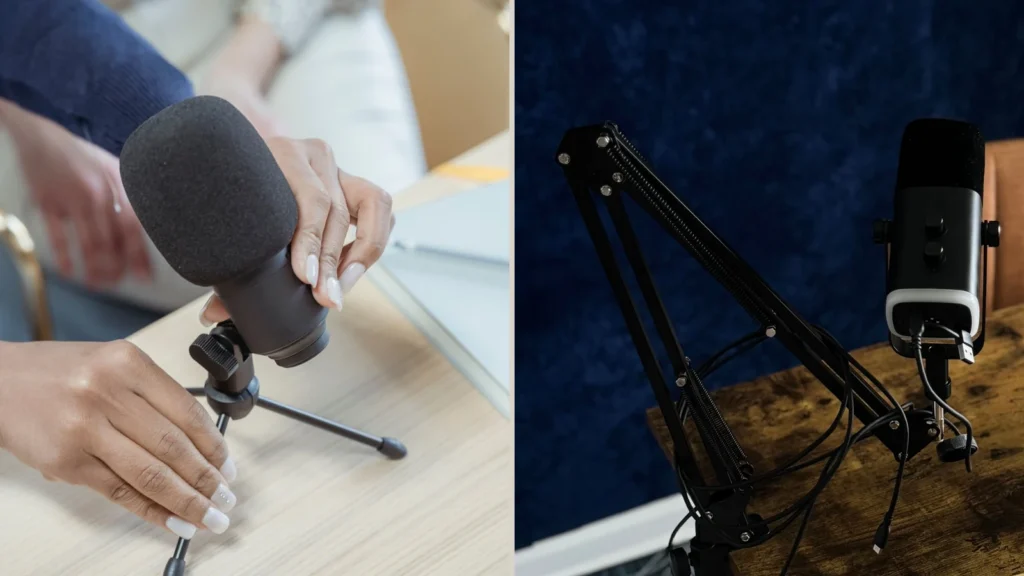
Compact tripod desk stand
Choose this when the microphone is light, the desk is stable, and the recording position does not need much adjustment. It is simple, but it can be too short for comfortable vocal distance.
Weighted round-base desk stand
Choose this when the mic needs a more planted base and the desk surface has enough room. It can feel cleaner than a tripod, but the base still sits directly on the recording surface.
Short desktop boom stand
Choose this when you need a little reach without clamping a full boom arm to the desk. It can help place the mic closer to the mouth, but it still needs stable desk contact.
Clamp boom arm
Choose this when the desk has a strong edge and you want the microphone to swing in and out. A boom arm is not automatically better; weak clamps and crowded cables can create their own problems.
Who Should Wait Before Buying
- You have not measured your recording height.
- Your real problem is fan noise, room echo or headphone bleed.
- You use a heavy microphone but have not checked the support capacity.
- Your desk has no stable clamp point or free surface area.
Beginner Setup Checklist
- Put the microphone where your mouth naturally sits.
- Record ten seconds while lightly tapping the desk.
- Check that the pop filter does not force the mic too far away.
- Route the cable so it does not pull on the stand.
- Decide whether a stand, boom arm or room change solves the real problem.
Read Next
- Home Vocal Recording for Beginners
- Table Stand vs Boom Arm for Podcast and Vocal Recording
- How to Record Vocals With a USB Microphone at Home
FAQ
Is a desk mic stand good enough for vocals?
Yes, if it reaches mouth height, stays stable and does not transmit too much desk movement into the recording.
Should beginners buy a boom arm instead?
Only if the boom arm solves a real positioning or desk-space problem and the desk can support the clamp safely.
Can a better stand remove room noise?
No. A stand can improve placement and reduce handling problems, but it does not silence a loud room.