
Decision Scorecard
| Decision Point | Best Fit | What To Check |
|---|---|---|
| Primary use case | Choose around the job you do most often. | Vocals, instruments, practice, monitoring, recording, or live use. |
| Setup complexity | Choose the simpler setup when performance is close. | Cables, software, stands, power, and compatibility. |
| Upgrade path | Choose the option that will stay useful longer. | Whether it still works when your setup grows. |
| Value | Choose the lower total cost, not only lower sticker price. | Accessories and replacement risk matter. |
Pros & Cons
Pros
- Frames the decision around use cases.
- Clarifies who should buy each option.
- Surfaces tradeoffs that spec tables often hide.
Cons
- There may not be one universal fit.
- A third alternative may be better if neither option matches your workflow.
Who It Is For
This comparison is for readers choosing between two close products and needing a clear decision path before buying.
Who Should Avoid It
Avoid forcing this decision if neither product matches your room, instrument, skill level, compatibility needs, or budget.
Alternatives
- Check a category buying guide for a broader shortlist.
- Read individual reviews if one option seems stronger.
- Look at accessories if setup cost is driving the decision.
Final Verdict
Pick the option that solves your main job with the least friction. If neither does, step back to the category guide before buying.
FAQ
How do I choose between two similar products?
Start with your main use case, then compare setup needs, reliability, and total cost.
Should I buy the more expensive option?
Only when the extra cost solves a real problem you will notice in use.
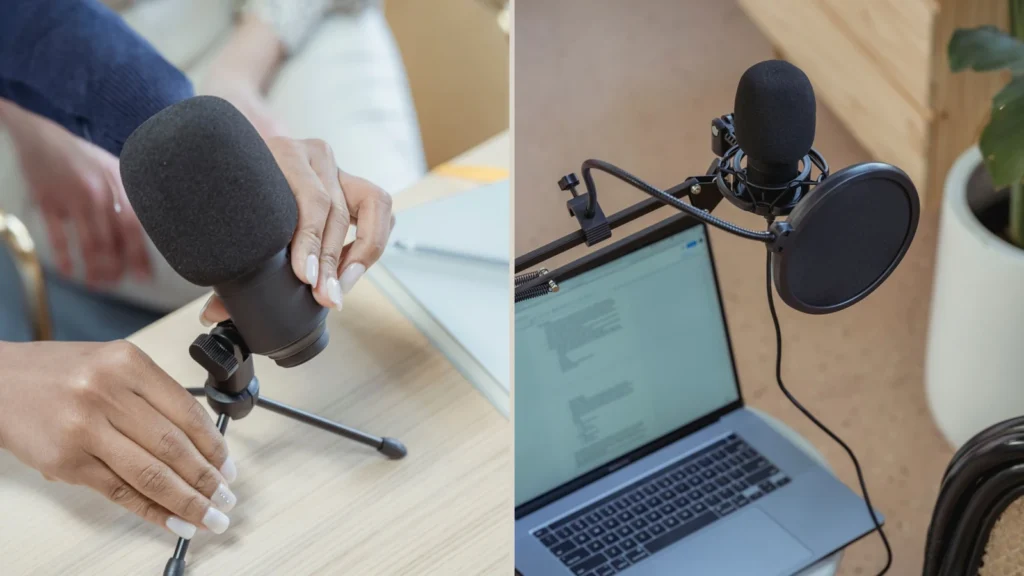
Small-Desk Mic Support Comparison
Answer first: A table stand is the simpler first choice if your desk is stable and you can keep the microphone at the right mouth height. A boom arm is usually better when you need the mic closer, want more desk space, or need to move the microphone in and out of position often.
This comparison is practical setup guidance, not a durability test or brand ranking.
Affiliate note: MusicalCritic may earn a commission from qualifying links. Editorial guidance is based on fit, setup needs, and source-backed research, not real-time price tracking or guaranteed outcomes.
The Real Choice Is Positioning
Beginners often buy a microphone before thinking about where it will sit. Vocal and podcast recordings usually improve when the microphone stays at a consistent distance, does not block the keyboard or screen, and does not pick up unnecessary desk bumps. The support choice should solve those workflow problems before it solves how the desk looks.
| Need | Table stand | Boom arm |
|---|---|---|
| Lowest setup complexity | Usually easier. | Needs clamp space and adjustment. |
| Consistent mouth distance | Works if the stand is tall enough. | Often easier to position close to the mouth. |
| Desk vibration | More exposed to keyboard and desk bumps. | Can reduce desk-contact issues, but still needs a stable clamp. |
| Small desk space | Uses desk surface area. | Can clear the desk surface. |
| Quick removal | Easy to pick up and move. | Better for swing-away use. |
Choose a Table Stand If
- You want the least complicated first setup.
- Your microphone is light enough for the stand and can reach mouth height.
- You record short takes and can avoid typing or hitting the desk while recording.
- You do not have a safe clamp point for a boom arm.
Choose a Boom Arm If
- You need the microphone close without leaning over the desk.
- You want the mic to swing away after recording.
- You need more space for a keyboard, interface or notebook.
- You can clamp the arm to a stable edge without damaging the desk.
Beginner Setup Checks
- Measure mouth height before buying a support.
- Check microphone weight against the support’s stated capacity.
- Leave space for headphone and USB/XLR cables.
- Record a short test while touching the desk to hear vibration risk.
- Use a pop filter or windscreen only if it does not force awkward distance.
Read Next
- Home Vocal Recording for Beginners
- Audio Interface vs USB Microphone for Beginner Vocals
- Best Desk Mic Stands for Small Home Studios
FAQ
Is a boom arm always better than a table stand?
No. A boom arm helps positioning and desk space, but a simple table stand can work well when the height and desk surface are suitable.
Can a table stand cause noise?
It can transmit desk bumps or typing into the microphone setup, especially when the stand sits directly on the recording surface.
What should beginners check first?
Check mouth height, desk stability, clamp space, microphone weight and cable routing before choosing the support style.