
Decision Scorecard
| Decision Point | Best Fit | What To Check |
|---|---|---|
| Primary use case | Choose around the job you do most often. | Vocals, instruments, practice, monitoring, recording, or live use. |
| Setup complexity | Choose the simpler setup when performance is close. | Cables, software, stands, power, and compatibility. |
| Upgrade path | Choose the option that will stay useful longer. | Whether it still works when your setup grows. |
| Value | Choose the lower total cost, not only lower sticker price. | Accessories and replacement risk matter. |
Pros & Cons
Pros
- Frames the decision around use cases.
- Clarifies who should buy each option.
- Surfaces tradeoffs that spec tables often hide.
Cons
- There may not be one universal fit.
- A third alternative may be better if neither option matches your workflow.
Who It Is For
This comparison is for readers choosing between two close products and needing a clear decision path before buying.
Who Should Avoid It
Avoid forcing this decision if neither product matches your room, instrument, skill level, compatibility needs, or budget.
Alternatives
- Check a category buying guide for a broader shortlist.
- Read individual reviews if one option seems stronger.
- Look at accessories if setup cost is driving the decision.
Final Verdict
Pick the option that solves your main job with the least friction. If neither does, step back to the category guide before buying.
FAQ
How do I choose between two similar products?
Start with your main use case, then compare setup needs, reliability, and total cost.
Should I buy the more expensive option?
Only when the extra cost solves a real problem you will notice in use.
Vocal Mic Accessory Comparison
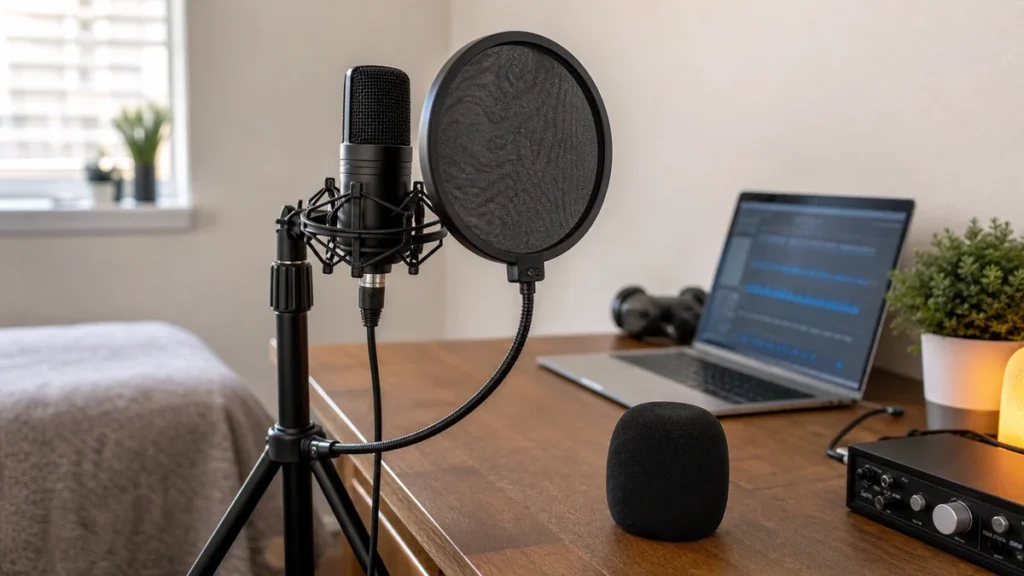
Answer first: For close vocal recording, start with a pop filter when plosives are the problem and a windscreen when breath, light air movement or microphone protection matters more. A pop filter sits between your mouth and the microphone; a windscreen covers the microphone grille. Neither fixes a loud room, bad gain staging or poor mic distance.
MusicalCritic may earn a commission from qualifying links. This comparison is based on official accessory information and editorial setup guidance, not measured plosive-reduction testing.
Quick Decision Table
| Need | Pop filter | Windscreen |
|---|---|---|
| Close vocal plosives | Usually the first accessory to try. | Can help, but is not the main close-vocal choice. |
| Breath or light air movement | Less direct fit. | Usually more useful. |
| Handheld or stage-style vocal mic | Awkward if the mic is handheld. | Often easier because it fits over the grille. |
| Bedroom recording desk | Good if the stand position is stable. | Useful when the mic position changes often. |
| Room noise or echo | Does not fix it. | Does not fix it. |
Use a Pop Filter If
- You hear hard bursts on words with P, B or T sounds.
- Your microphone is on a stand or boom arm and the filter can stay in a fixed spot.
- You need a visible distance guide between mouth and microphone.
- You record vocals, voiceover, demos or podcast-style speech close to the mic.
Use a Windscreen If
- You use a handheld dynamic mic or move the microphone often.
- You need light breath or air-movement protection around the grille.
- You want a simple accessory that stays attached to the microphone.
- Your main problem is not a sharp close-vocal plosive burst.
When to Use Both
Some beginners use both when a microphone is difficult to control, but it is better to start simple. First set a consistent mouth distance, record a short test, then add the accessory that solves the audible problem. If the take still sounds boomy, harsh or roomy, the next fix is usually placement and gain, not more fabric or foam.
Setup Mistakes to Avoid
- Do not put a pop filter directly against the microphone grille.
- Do not use a windscreen as proof that plosives are solved.
- Do not record so close that every breath hits the capsule area.
- Do not blame the accessory before checking gain and mouth angle.
Read Next
- Home Vocal Recording for Beginners
- Do You Need a Pop Filter for Vocals?
- How to Place a Pop Filter for Vocal Recording
FAQ
Is a windscreen the same as a pop filter?
No. A windscreen covers the microphone grille. A pop filter sits between the singer and the microphone.
Can a pop filter make vocals sound professional?
No. It can help with plosives, but the vocal sound still depends on the room, mic, distance, gain and performance.
Should beginners buy both?
Not at first. Buy the one that solves your actual problem, then test before adding more accessories.