
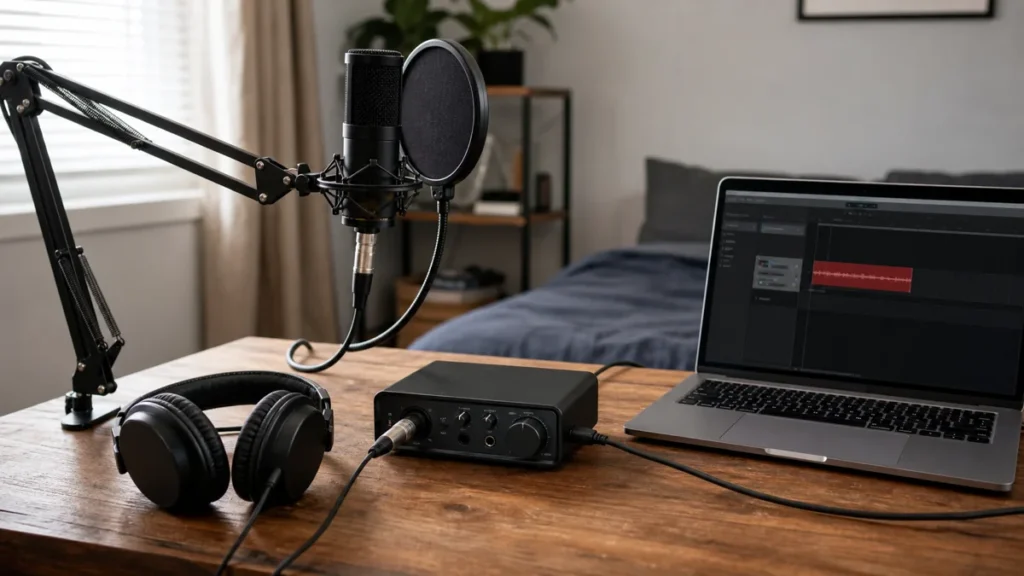
A beginner vocal chain is the path from your voice to the recorded track: microphone, stand, pop control, cable, audio interface or USB connection, headphones, and recording software. The best budget chain is usually the one that removes the weakest practical problem first, not the one that buys the most impressive single item.
MusicalCritic may earn a commission from qualifying links. This guide is beginner buying-order guidance, not a field test, retailer-feed ranking, or paid product placement. Illustrative home vocal chain setup; specific products are not pictured.
Quick Answer
If you are starting from nothing, build the chain in this order: a microphone path you can connect reliably, a stable stand, basic pop control, closed-back headphones, the right cable or adapter, and a simple recording workflow. Do not spend the whole budget on one expensive microphone if you still have no stand, no headphones, or no way to set clean input gain.
Who This Guide Is For
This guide is for beginners recording vocals at home for demos, songwriting, covers, podcasts, rap vocals, guide vocals, or first releases. It is especially useful if you have a small bedroom setup and need to decide what matters first.
Who This Is Not For
This is not a professional studio build, a microphone shootout, or a ranked list of exact products. If you already own multiple microphones, outboard preamps, monitors, acoustic treatment, and a treated room, your bottleneck is probably more specific than this beginner chain.
The Core Vocal Chain
Microphone Path
You need either a USB microphone that connects directly to your computer or an XLR microphone connected to an audio interface. USB is simpler. XLR plus an interface is more flexible if you plan to upgrade later.
Stand Or Boom Arm
A stable stand can matter more than a microphone upgrade. If the mic moves, sinks, or picks up desk bumps, takes become inconsistent. Choose a floor stand for shaky desks and a clamp boom only when the desk edge is strong enough.
Pop Control
A pop filter or windscreen helps reduce plosive bursts from P and B sounds. It does not fix a noisy room, but it can prevent a common beginner problem before it reaches the recording.
Headphones
Closed-back headphones are the safer first choice for vocal tracking because they reduce backing-track bleed into the microphone. Open-back headphones can be useful later for editing or listening, but they are usually not the first vocal-recording purchase.
Cables And Adapters
Many beginner chains fail because one small connector is missing. Check whether you need an XLR cable, USB cable, 3.5 mm to 1/4-inch headphone adapter, or headphone extension before the recording day.
What To Buy First If Money Is Tight
| Problem | First fix | Why |
|---|---|---|
| No reliable way to record | USB mic or interface plus mic path | You need a working input before accessories matter. |
| Mic is handheld or unstable | Stand or boom arm | Consistent distance improves takes and reduces handling noise. |
| Popping on consonants | Pop filter or windscreen | Plosives are easy to hear and cheap to reduce. |
| Backing track leaks into vocal | Closed-back headphones | Monitoring bleed can make editing and mixing harder. |
| Nothing reaches or connects | Correct cable or adapter | A missing adapter can stop the whole session. |
What Not To Upgrade First
Do not buy acoustic foam before you understand microphone placement and room noise. Do not buy an expensive microphone if the stand is weak and the room is loud. Do not buy open-back headphones as your only tracking headphones. Do not buy a large bundle unless you can verify that the stand, cable, headphone connection, and mic path actually fit your setup.
USB Path vs XLR Path
A USB mic path is simpler for one-person recording because the microphone, preamp, and converter are built into one device. An XLR path with an audio interface takes more setup, but it gives you more upgrade choices. Beginners should choose based on workflow and future needs, not because one path is always professional and the other is always wrong.
Beginner Buying Checklist
- The mic connects to your computer or interface without an extra surprise purchase.
- The stand holds the mic at mouth height without wobbling.
- You have pop control for close vocal takes.
- Closed-back headphones are available for tracking.
- Headphone and mic cables reach without pulling across the desk.
- You can set input gain separately from headphone volume.
- You can record a short test and listen back before committing to a full take.
What To Read Next
For the full beginner path, start with home vocal recording. For small accessories, see best home vocal recording accessories under $100. If you are deciding between buying one mic or a full bundle, compare one mic vocal setup vs full starter kit. If monitoring is confusing, read USB mic monitoring vs interface monitoring for beginners.
FAQ
Do beginners need an audio interface for vocals?
No, not always. A USB microphone can work for a simple first setup. An interface becomes more useful when you want XLR microphones, direct monitoring, instruments, or a clearer upgrade path.
Should I spend most of my budget on the microphone?
Only if the rest of the chain already works. A better microphone will not fix a shaky stand, missing cable, loud room, or headphone bleed.
Is a starter kit better than buying pieces separately?
A starter kit can be convenient, but only if each included piece fits your setup. Check the stand, cable, headphones, connector type, and monitoring path before assuming a bundle is better value.
What is the cheapest useful vocal upgrade?
It depends on the weakest link. For many beginners, a stable stand, pop filter, or correct headphone adapter can improve the session more than a more expensive headline product.