
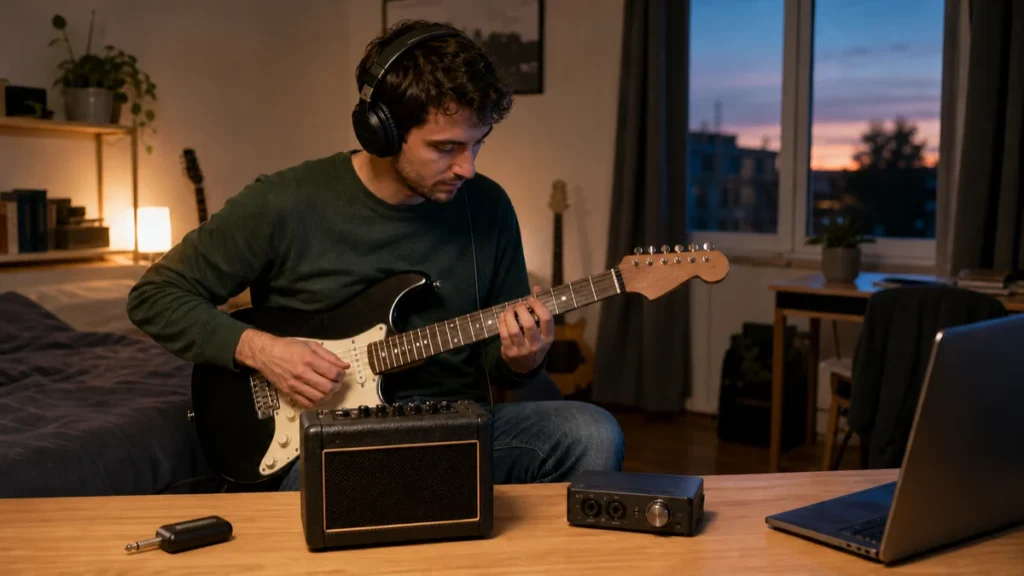
Answer First: Which One Should an Apartment Beginner Buy?
Choose a guitar headphone amp when silent practice, portability, and the fewest setup steps matter most. Choose a practice amp when you want to play through a speaker without starting a computer. Choose an audio interface when recording and software amp sounds matter enough to accept a computer, drivers, and monitoring setup. No option is universally best; the right first buy depends on whether you need a speaker, recording, portability, or instant start-up.
Best For—and Not For
Best for
- Beginners practicing electric guitar in a bedroom, dorm, or shared apartment.
- Players deciding between silent practice and a first recording setup.
- Renters who need compact gear and simple cable management.
- Near-purchase buyers who want to understand the total setup, not just the main device.
Not for
- Acoustic-only players who do not need amplification.
- Band rehearsals, stage monitoring, or keeping up with a drummer.
- Detailed rankings of current models or live deal recommendations.
- Players who already own a complete amp, modeler, or recording chain and only need troubleshooting.
Quick Decision Table
| Decision point | Guitar headphone amp | Small practice amp | Audio interface |
|---|---|---|---|
| Best reason to choose it | Fast, private practice with very little setup | Speaker and headphone practice from one box | Recording and software amp tones on a computer |
| Computer required | Usually no | Usually no | Usually yes; some interfaces also support compatible mobile devices |
| Room speaker | No | Yes | No unless you add powered monitors or another playback system |
| Recording path | Model-dependent; do not assume USB recording | Model-dependent; a phones/recording output is not the same as USB audio | Core purpose, with compatible recording software |
| Tone flexibility | Limited to the models/effects built into the device | Varies from a few simple controls to deep modeling | Broad, but depends on installed amp-sim software and computer performance |
| Setup friction | Lowest | Low | Highest |
| Easy to expand later | Limited | Moderate; depends on outputs and effects loop/features | Strong for recording, microphones, monitors, and production |
| Main limitation | No shared speaker experience | Speaker volume can conflict with apartment living | Software, drivers, latency, and routing add complexity |
Choose a Guitar Headphone Amp for the Fastest Private-Practice Path
A guitar headphone amp is a compact amplifier or modeler designed to feed wired headphones instead of a speaker. Some plug directly into the guitar; others sit between the guitar and headphones with a short cable. A current example, Fender’s Mustang Micro Plus, combines a built-in guitar plug, headphone output, onboard amp/effect models, rechargeable power, Bluetooth audio streaming for backing tracks, and USB recording. Those features show what the category can offer, but they are not universal—check the exact model before assuming it records or works with an app.
It is the best fit when:
- You mainly practice alone with headphones.
- You want to pick up the guitar and start without a computer or floor full of gear.
- You frequently move between rooms or travel with the setup.
- You need backing-track playback but do not need a full DAW workflow.
Skip it when:
- You want to hear the guitar through a room speaker.
- You need footswitch control, complex preset changes, or multiple instruments at once.
- You plan to record vocals or microphones as part of the same setup.
- You dislike playing in headphones for long sessions.
Complete headphone-amp setup
- Electric guitar with a compatible output-jack position.
- The headphone amp itself, plus its charging cable, batteries, or power supply as specified.
- Wired headphones or wired earbuds with the correct connector or a suitable adapter.
- An optional phone, tablet, or computer for backing tracks or editing if the model supports it.
- A safe place for the headphone cable so it does not snag the guitar or chair.
Important Bluetooth check: Bluetooth on a guitar device often means streaming backing audio into the unit or editing from an app. It does not automatically mean you can monitor the guitar through Bluetooth headphones. Fender’s own Mustang Micro Plus instructions still direct the player to connect wired headphones. Verify the signal direction and supported profiles in the manual.
Choose a Practice Amp If You Need Both a Speaker and Headphones
A small practice amp is the most self-contained choice when you want a room speaker during daytime practice and a headphone output later. It does not require a computer, and the physical controls are usually easier to understand than a DAW. Some compact amps also run on batteries, accept backing audio, and provide a phones/recording output. For example, BOSS documents all three on the KATANA-MINI.
It is the best fit when:
- You want to play for a teacher, friend, or family member without sharing headphones.
- You prefer turning physical knobs to managing software.
- You want the option of low-volume speaker practice during reasonable hours.
- You need a portable all-in-one practice box rather than a production system.
Skip it when:
- Every practice session must be private and you have no use for a speaker.
- Recording and editing on a laptop are the main goals.
- You need many routable effects, preset automation, or re-amping.
- Your apartment rules or household schedule make speaker use unrealistic.
Complete practice-amp setup
- Electric guitar.
- Standard 1/4-inch instrument cable.
- Practice amp with a clearly documented headphone output if silent practice matters.
- Required AC adapter or batteries; confirm whether the adapter is included or sold separately.
- Wired headphones and the correct plug/adapter for the amp’s phones output.
- Optional aux cable or Bluetooth-capable source if the exact amp supports backing tracks.
- A stable surface with airflow and cable clearance—not a bed or a place where the amp can fall.
Recording limitation: a jack labeled “phones/rec out” can feed another recording device, but it is not necessarily a computer audio interface. You may still need the right cable, input, level setting, or separate interface. If USB recording matters, require that feature explicitly rather than inferring it from a headphone output.
Choose an Audio Interface for Recording and Software Amp Tones
An audio interface converts the guitar signal for a computer or compatible mobile device and provides a headphone output. For electric guitar, look for a high-impedance instrument input—often labeled Instrument, Inst, or Hi-Z. Focusrite’s current Solo guide, for example, tells guitarists to use a 1/4-inch TS cable and select instrument mode. The same guide shows the required USB connection to a computer and a separate headphone connection.
The interface alone is not the complete guitar sound. To hear a modeled amp, cabinet, and effects, you normally need compatible amp-simulation software in a DAW or standalone app. That makes this route more expandable, but also more sensitive to driver support, buffer settings, software monitoring, and computer performance.
It is the best fit when:
- You want to record guitar parts, edit takes, or build complete songs.
- You want to try different amp and cabinet simulations without buying multiple amplifiers.
- You may add a microphone, vocal, keyboard, or powered monitors later.
- You are comfortable learning basic DAW routing and troubleshooting.
Skip it when:
- You want instant, computer-free practice.
- Your computer is unsupported, unreliable, or already struggles with real-time audio.
- You do not want to manage drivers, software authorization, updates, or files.
- You expect the interface to provide a room speaker by itself.
Complete audio-interface setup
- Electric guitar and a 1/4-inch TS instrument cable.
- Interface with a documented Hi-Z/instrument input and headphone output.
- Supported computer or mobile device, with enough ports and the correct USB cable or adapter.
- Manufacturer driver/control software where required by the operating system.
- DAW or standalone amp-simulation software, plus any required license/account.
- Wired headphones and the correct connector or adapter.
- Optional powered monitors and appropriate line cables for later speaker use.
- A plan for file storage and backups if you record.
Direct monitoring versus hearing your amp sim
Focusrite defines direct monitoring as routing the interface input straight to the headphone or line outputs with near-zero latency while still sending the signal to the DAW. That is useful for a clean input, but a software amp sim lives on the computer. If you want to hear the processed amp-sim tone, you generally need software monitoring and a low enough buffer for comfortable playing. Do not turn on both routes blindly: hearing the direct input and a delayed software return together can create a doubled or echo-like sound.
Choose by the Session You Will Actually Have
“I practice for 20 minutes after everyone is asleep.”
Start with a headphone amp. The minimal setup is the advantage. Confirm the guitar’s jack shape will not make a direct-plug device awkward, and choose wired headphones you can wear comfortably.
“I take lessons and sometimes want my partner to hear me play.”
A small practice amp is more practical. Use the speaker at considerate levels and times, then switch to its documented headphone output for late sessions.
“I want to record riffs and eventually make full songs.”
Buy an audio interface with a proper instrument input. Budget time—not just money—for a DAW, amp sim, monitoring setup, and file management.
“I want many effects and foot control, but I do not want a laptop every time.”
Consider a multi-effects modeler as the main alternative. Current units can combine amp/effect processing, headphones, foot control, and—in some cases—USB recording. BOSS’s GX-1 is one example of that feature pattern. Check whether the unit can drive headphones directly and whether its USB implementation supports your device and software.
Apartment Limitations None of These Devices Can Remove
- An electric guitar is not physically silent. Pick attack, string noise, fret noise, chair movement, and foot tapping can still be audible in the room.
- Headphones protect neighbors, not automatically your hearing. The World Health Organization says risk depends on volume, duration, and frequency of exposure. Keep levels moderate, take breaks, and respond to ringing or hearing changes.
- Headphone comfort matters. A technically capable setup that becomes uncomfortable during your normal practice session may reduce how often you use it.
- Connector labels matter. A 3.5 mm headphone jack, a 6.35 mm headphone jack, a line output, and USB audio are not interchangeable features.
- Software ownership can outlast the hardware purchase. Check supported operating systems, driver policy, included licenses, and whether an amp sim can run standalone.
Alternatives Worth Considering
- Multi-effects/modeler: better than a simple headphone amp if you need foot control, many effects, presets, and a path to speakers or recording.
- Modeling practice amp: useful if you want a speaker now and deeper app-based editing later, but check whether essential controls work without the app.
- Existing amp with a load box or dedicated silent-output solution: potentially useful for experienced players, but it is more complex and model-specific than most beginners need. Never connect an amplifier’s speaker output to headphones or an interface unless the manufacturer explicitly documents that path.
- Unplugged electric practice: the zero-cost option for fingering drills, though it does not teach you how gain, sustain, noise, and effects respond.
Buy-Before Checklist
- Write one primary goal: silent practice, speaker practice, recording, or all-in-one effects.
- Confirm the device has a guitar-level/Hi-Z input—not only a line or microphone input.
- Check the headphone jack size and whether your headphones need an adapter.
- Verify that plugging in headphones mutes the speaker if that behavior matters.
- Do not assume Bluetooth means wireless guitar monitoring.
- If recording matters, confirm true USB audio support, supported operating systems, required drivers, and included software.
- List every extra item: instrument cable, headphones, adapter, power supply, USB cable, software, stand, and storage.
- Check whether presets and core controls remain usable without an app or internet connection.
- For an interface, confirm whether you can hear the amp sim at a comfortable latency on your current computer.
- Choose a setup you can leave ready without blocking a walkway or creating a cable trip hazard.
- Use a returns policy that gives you time to check noise, comfort, guitar-jack fit, and software compatibility.
Frequently Asked Questions
Is a guitar headphone amp better than a practice amp for an apartment?
It is better if nearly every session will use headphones and you want the smallest, fastest setup. A practice amp is better if you also want a speaker for lessons, daytime practice, or playing for another person.
Can I plug an electric guitar directly into an audio interface?
Yes, if the interface has an instrument or Hi-Z input. Use the cable and input mode specified by the manufacturer. A line-only input may load or level the guitar signal incorrectly.
Do I need an amp sim with an audio interface?
You need an amp sim if you want the sound and response of a modeled guitar amplifier and cabinet. Without processing, direct monitoring normally gives you the clean input signal. Some interfaces include amp-sim software, but the license and compatibility vary.
Will direct monitoring remove guitar latency?
It can give you near-zero-latency monitoring of the interface input, but that direct signal may be dry. Hearing a software amp sim requires the computer to process and return the signal, so buffer settings and system performance still matter.
Can I use Bluetooth headphones for guitar practice?
Do not assume so. Many guitar devices use Bluetooth only to receive backing audio or connect an editing app. Real-time Bluetooth headphone monitoring may be unsupported or feel delayed. Check the exact manual; wired headphones remain the most predictable route.
Can a small practice amp record to a computer?
Some can, but the category does not guarantee it. Look for explicit USB audio-interface or recording support. A phones/recording output may require a separate input device and correctly matched cable.
Which path is cheapest?
There is no durable category-wide answer because prices and included accessories change. Compare the complete usable setup. A low-cost interface can still require headphones, software, adapters, and a suitable computer; a practice amp may require a cable and power adapter; a headphone amp may require compatible wired headphones.
Do open-back or closed-back headphones make more sense?
Closed-back headphones reduce sound leakage and are usually easier to use around other people. Open-back headphones can feel spacious and comfortable, but they leak more sound and provide less isolation. Comfort, safe listening level, and connector fit matter more than the label alone.
Evidence and Recommendation Boundary
This article compares setup categories, not specific products. Product pages are used only to verify representative capabilities such as guitar inputs, headphone outputs, speaker operation, USB recording, direct monitoring, and Bluetooth backing-audio behavior. A feature on one example does not apply to every product in its category.
MusicalCritic has not claimed hands-on testing, lab measurement, current pricing, stock, ratings, sales volume, brand authorization, or a universal winner. Before publication, the editor should re-open every linked source, confirm that no product status or compatibility statement changed, and remove any source that no longer supports the associated claim.
Sources
| Source | What it verifies | Boundary |
|---|---|---|
| Fender: Mustang Micro Plus | Representative headphone-amp features: direct guitar plug, wired headphone output, rechargeable power, Bluetooth backing-audio streaming, and USB recording. | One model; not proof that every headphone amp includes these features. |
| BOSS: KATANA-MINI | Representative compact practice-amp path with speaker, battery/adapter power, AUX input, and Phones/Rec Out. | One model; availability and included power accessories vary. |
| Focusrite: Using Your Scarlett Solo | Guitar connection by 1/4-inch TS cable, instrument mode, wired headphones, and USB computer connection. | Connection example for one interface family; verify every device independently. |
| Focusrite: What Is Direct Monitoring? | Direct monitoring routes the input to outputs with near-zero latency while the signal can still be recorded in a DAW. | Does not guarantee a processed software amp-sim tone through the direct path. |
| BOSS: GX-1 Guitar Effects Processor | Representative multi-effects alternative with foot controls, amp/effect processing, Bluetooth backing audio, and USB recording. | Alternative category example, not a ranked recommendation. |
| World Health Organization: Safe Listening | Listening risk depends on level, duration, and frequency; lower volume, breaks, and well-fitted headphones reduce risk. | Health guidance, not a measurement of any device in this article. |
Suggested Internal Links
- How to Build a Beginner Guitar Practice Rig
- Best Audio Interfaces for Guitar
- Best Beginner Electric Guitars for Home Practice
- Can You Use a Guitar With an Audio Interface?
- What Accessories Do Beginners Need for Electric Guitar?
- Starter Pack vs Separate Guitar Gear
- How to Choose Your First Audio Interface
- What Is Latency in Recording?
- How to Check If Studio Headphones Need an Amp
- Guitars Hub
- Audio Interfaces Hub
- Editorial Policy
- Affiliate Disclosure
How We Test
Editorial research and first-party documentation; no hands-on or lab testing is claimed.
Review Basis
First-party manufacturer documentation, authoritative safe-listening guidance, and fit-based editorial analysis.