
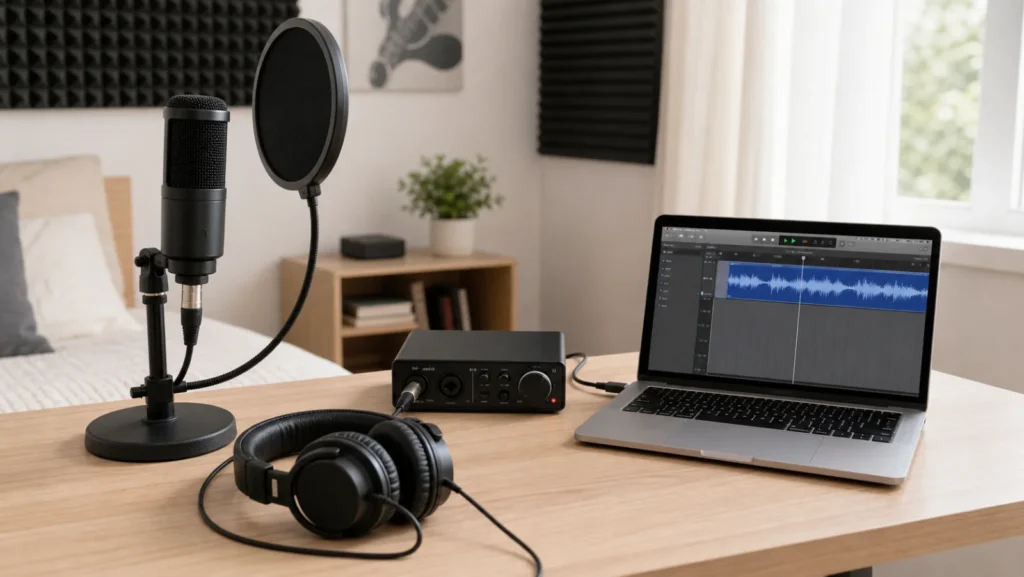
A beginner vocal recording bundle under $300 should solve four practical problems: getting a clear vocal into the computer, hearing the take without distracting bleed, keeping the microphone stable, and controlling plosives before they hit the capsule. Treat the number as a planning budget, not a live price guarantee, because retailer pricing and stock change constantly.
Quick Recommendation
For most new vocal recordists, the safest first bundle is either a simple USB microphone with closed-back headphones, or an XLR dynamic microphone with a small audio interface, pop filter, stand, and cable. Choose the USB route if you want the fewest parts. Choose the XLR route if you expect to upgrade microphones, add instruments, or record in a room that is not well treated.
Decision Checks
- Microphone path: pick USB for simplicity or XLR for upgrade flexibility.
- Computer connection: use a USB mic directly, or pair an XLR mic with a simple one-input interface.
- Monitoring: use closed-back headphones so the backing track does not leak into the vocal mic.
- Physical setup: include a stand or boom arm, pop filter, and the right cable from day one.
Bundle Path A: Simple USB Vocal Setup
A USB microphone bundle is the easiest way to start if you record one voice at a desk and do not want to learn interface gain, phantom power, or cable routing on day one. The bundle should still include closed-back headphones, a stable stand or boom arm, and a pop filter. The mistake is buying the microphone alone and then recording with laptop speakers or unstable desk placement.
Bundle Path B: XLR Mic and Entry Interface
An XLR bundle takes slightly more setup, but it gives beginners a better upgrade path. A dynamic vocal microphone, one-input interface, XLR cable, stand, pop filter, and closed-back headphones can be enough for home vocals. This route is especially practical for bedrooms, shared apartments, and untreated rooms because many dynamic microphones reject more room sound than sensitive condenser microphones.
What to Buy First
- Buy the microphone path and monitoring together; you need to hear the take while recording.
- Buy a real stand or boom arm before upgrading plugins.
- Buy a pop filter before judging whether your microphone sounds harsh.
- Use the included or basic cable first unless there is noise, crackle, or connection failure.
What Not to Buy Yet
Do not spend the first budget on a large condenser microphone, vocal reflection shield, premium preamp, or plugin bundle before the basic signal chain is stable. Beginners usually get larger improvements from mic position, headphone isolation, pop control, and gain staging than from expensive add-ons.
Upgrade Path After the First Bundle
Once you can record clean takes without clipping, delay, plosives, or headphone bleed, the next upgrades should be targeted. Add light room treatment if the voice sounds boxy, improve headphones if bleed remains audible, or upgrade the interface only when you need more inputs, better monitoring, or lower-latency workflow.
Buying Checks Before You Order
- Confirm the microphone connection matches your plan: USB directly to computer, or XLR into an interface.
- Confirm your headphones are closed-back for tracking vocals.
- Confirm the stand fits your room and desk layout.
- Confirm an XLR bundle includes a cable, or add one separately.
- Leave some budget for small accessories instead of spending every dollar on the microphone.
Useful Next Steps
If your budget is tighter, start with the home vocal recording setup under $200. If you are still choosing the recording path, compare USB mic vs XLR setup for beginner vocals. For monitoring, use the closed-back headphones guide. Before buying anything, run through the beginner vocal recording setup checklist and the main home vocal recording hub.
FAQ
Can a beginner vocal setup really stay under $300?
Often yes, if the goal is a practical starter rig rather than a studio-grade chain. The key is choosing either a USB route or a focused XLR route and avoiding upgrades that do not solve the first recording problems.
Should I buy a USB mic bundle or an XLR bundle?
Buy USB if simple setup matters most. Buy XLR if you want a system that can grow with a better microphone, different interface, or more serious recording workflow.
Are headphones part of the vocal bundle?
Yes. Closed-back headphones are part of the recording system because they help you monitor the backing track without sending that sound back into the vocal microphone.
Review Basis
Review basis: This guide is built around beginner home vocal recording constraints: small rooms, limited budgets, simple computer setups, and the need to avoid avoidable failures such as plosives, unstable mic placement, clipping, headphone bleed, and buying parts that do not work together.